
Pool automation systems control your pump speed and schedule through a wired RS-485 communication link, not a simple on/off relay — this is what enables smartphone app control and variable-speed programming. Most connection problems trace to a damaged or loose communication cable, not the pump itself. Verify the physical connection before assuming software or hardware failure.
How Automation Actually Controls Your Pump
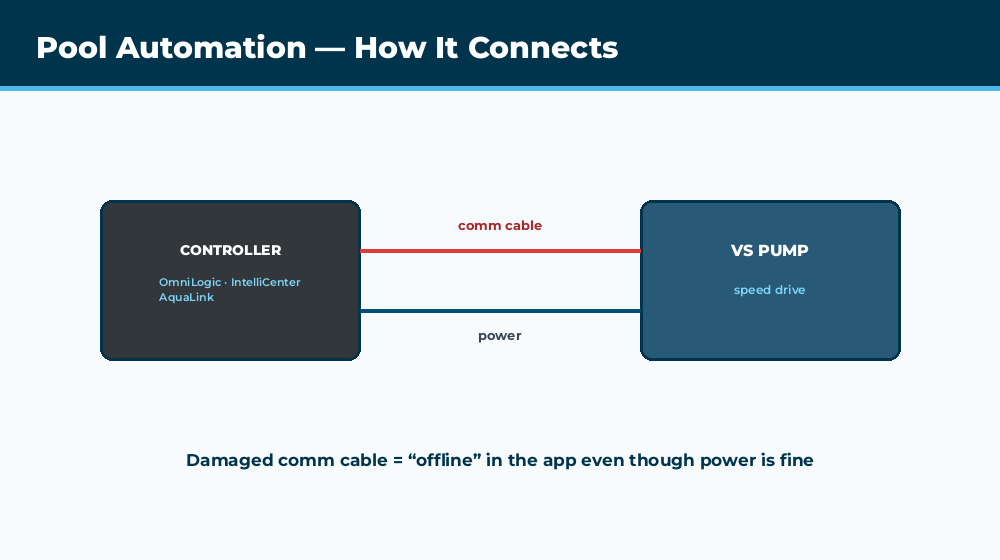
Variable-speed pumps integrated with automation don’t just get switched on and off — the automation controller sends specific speed commands over a communication protocol (usually RS-485, a 2-wire digital signal standard) that the pump’s onboard drive interprets and executes. This is fundamentally different from older single-speed pump control, which is just a relay closing a circuit. Understanding this distinction matters for troubleshooting: a “pump not responding to app” complaint is often a communication cable issue, not a pump hardware failure.
Connecting a Hayward variable-speed pump to an OmniLogic control panel — the correct wiring and configuration approach.
Hayward OmniLogic / OmniHub
Connects to compatible Hayward VS pumps (EcoStar, MaxFlo VS) via a 4-wire communication cable separate from the power wiring. Common issues: incorrect wire color matching at the connector (verify against Hayward’s documentation for your specific pump model — pinouts have changed across firmware revisions), and physical cable damage from rodents or UV degradation in outdoor runs. The OmniLogic app (iOS/Android) provides remote scheduling and speed control once the physical connection and initial pairing are correct.
Pentair IntelliCenter / EasyTouch
Controls Pentair IntelliFlo and compatible VS pumps via RS-485. Common issue: multiple devices on the same RS-485 bus (pump, chlorinator, heater) require correct address configuration — if two devices share an address, neither communicates reliably. Check the IntelliCenter’s device list for duplicate or conflicting addresses if a specific pump isn’t responding while others on the same bus work fine.
Jandy AquaLink
Uses a 4-wire communication link similar in concept to the others, connecting AquaLink controllers to compatible Jandy VS FloPro and ePump units. A common Jandy-specific issue: the power center supplies the controller a low-voltage signal via two of the four wires while the other two carry data — disconnecting and reconnecting the center two wires (with power off) is a documented troubleshooting step for “fault unknown” type errors, effectively forcing the controller to reload default communication settings.
General Troubleshooting for Any System
Check the physical communication cable for damage along its entire run — this is the single most common cause of “pump won’t respond to automation” complaints. Power cycle both the pump and the controller (off at the breaker for 30 seconds, then restore) to clear temporary communication faults. Verify firmware versions are compatible if you’ve recently updated either the controller or replaced the pump. Check for any address conflicts if multiple devices share a communication bus.
When the Pump Runs Fine Manually But Not Through the App
This pattern almost always points to the communication link rather than the pump or the app itself. If you can start and run the pump using its local control pad but the app shows it as offline or unresponsive, check the communication cable connection at both ends before assuming a software problem.
Frequently Asked Questions
Can I add automation to an existing single-speed pump?
Only basic on/off relay control — single-speed pumps do not have the communication interface needed for speed control or detailed app integration. Full automation features require a variable-speed pump with the manufacturer’s communication protocol built in.
Why does my pump show as offline in the automation app?
Almost always a communication cable issue — check for physical damage along the run, verify connector pins are seated correctly, and confirm the cable is not pinched or corroded at either end. Power cycling both devices is the next troubleshooting step.
Can I mix brands — a Pentair pump with a Hayward automation system?
Generally no, not for full speed and communication integration. Each manufacturer’s automation system is designed around their own communication protocol and pump firmware. Basic relay-based on/off control can sometimes bridge brands, but full speed programming typically requires matching brands.
My automation system shows the right schedule but the pump runs at the wrong speed — why?
Check for a manual override active either at the pump’s local control pad or within the automation system itself — local overrides at the pump can take priority over scheduled commands from the controller depending on the system’s configuration.
How do I reset my pool automation system if it is not communicating with the pump?
Power cycle both the automation controller and the pump (off at the breaker for at least 30 seconds each). For persistent issues, some systems support a factory reset of communication settings — consult your specific system’s documentation, since the exact procedure varies by brand and model.